Introducing Site Intelligence. Ask your AI to build pages, fix SEO and keep your site up to date.Site Intelligence: Use AI to attract your ideal client. Learn more ›Year-end offer: Save $1,500 with 3 months of Managed Site Intelligence, free.Year-end offer: Save $1,500 on Site Intelligence. See the offer ›

Onboarding

Setup, step by step.

Here's who does what, and what to have ready.

30 days, typical setup1
2 outside approvals, MLS and texting
3 to 5 hours of your time

From signup to up and running.

Most of setup is on us. Two approvals run alongside it, and their timing is out of our hands.

Start

Intake forms and kickoff

You send your intake form, domain access and marketing access forms right away. Your buildout specialist sends a kickoff email, then meets with you on an access call in week 2.

Within 30 days1

Initial setup

We build your new site on a staging domain, set up your CRM and show you how to import your contacts. Keeping Follow Up Boss or Sure Send? We connect it. Not ready to be published within 30 days of your first three onboarding forms? Your next month is on us. How our 30-day promise works ›

Alongside setup

MLS approval

We request your MLS feed and walk you through the paperwork. Your broker of record, your MLS and our data provider all have to sign off, so we can't set the pace.

Alongside setup

Calling and texting

Buy a business number or port yours. Porting usually takes 10 to 20 business days, depending on your carrier. Texting needs A2P 10DLC approval from Twilio and the carriers, using your business EIN. The carrier fee is included.

When you're ready

Up and running

Once you approve your site, we switch your domain over and follow-up starts. Everything else runs while MLS and texting approvals finish.

We do the heavy lifting.

Most of onboarding is on us. The faster you reply, the faster you're set up.

GGMS

We handle

Building your website from your brand
Setting up your CRM and follow-up
Showing you how to import your contacts and map your fields
Walking you through MLS data approval
Setting up or porting your business number
Getting your texting approved for A2P 10DLC
Connecting Follow Up Boss or Sure Send if you keep it
Setting up your domain so your email sends from you
Connecting your AI to your website, on your access call
Setting up your Google Ads and Tag Manager accounts, with access for you
You

You handle

Sending your intake form and domain access right away, and joining your access call
Replying quickly, and signing your MLS paperwork when it comes
Reviewing your new site and giving clear feedback. More rounds of changes add time. With a custom homepage, reviewing your mockup too. The days it waits on your feedback don't count toward the 30 days.
Sending your marketing access form. Add GGMS as a partner on the ad accounts you have, and we create the ones you don't. Our guide shows you how.
Importing your contacts, if you’re bringing them. Ask your current platform for the export early, and we’ll show you how.
Moving in

Your contacts come with you.

Upload a .csv, map your fields and you're in. Up to 50,000 contacts at a time.
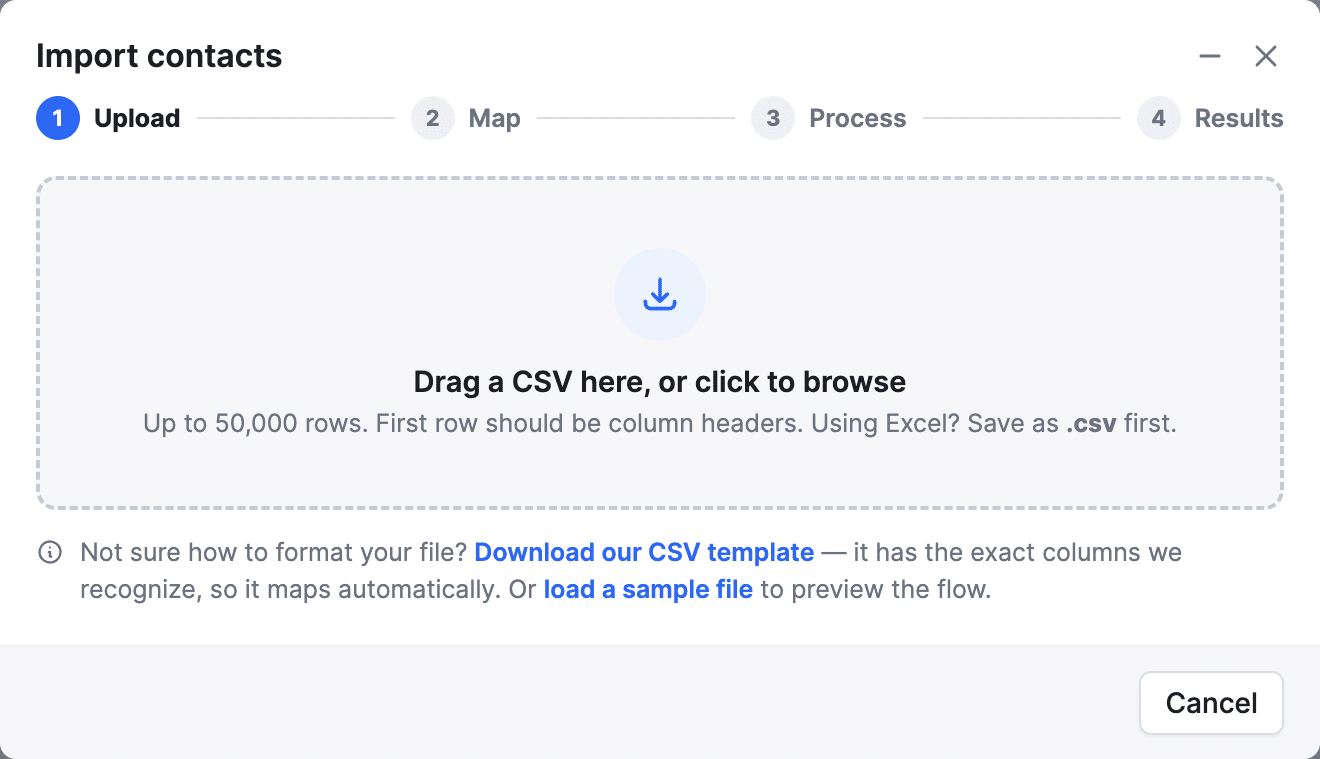
Your old site stays up We build on a staging domain, then switch your domain when you're happy.
Your custom fields map over Use our CSV template, or match your own columns.
Your plans start fresh You get GGMS new lead and nurture plans. Want your old ones? Add them to a Content Move.
Your pages and posts, if you want them Have your AI rebuild them for free, or add a Content Move and we’ll do it.

What to have ready.

Gather these before you start your intake form, and setup moves faster.

Brand Your logo, brand colors and any fonts you use.
About you A headshot, a short bio and the areas you serve.
MLS Your MLS name and agent ID so we can start the approval.
Brokerage Your broker of record's name and contact info. They sign off on your MLS feed.
Business EIN Needed to register your texting (A2P 10DLC). No EIN yet? You can get one free from the IRS.
Contacts Bringing leads? A .csv export from your current CRM or spreadsheet.
Follow Up Boss or Sure Send If you're keeping one, admin access to that account so we can connect it.
Phone Your current number and carrier account info, if you're porting it.
Domain Access to where your domain is registered. We switch it over once your new site is ready.
Your AI A ChatGPT, Claude, Gemini or Perplexity account, if you want to run your site with AI.

Running ads? Google Ads access, your logo and photos, and who follows up on leads. See what we need ›

Your first 90 days

A plan for your first 90 days.

Every package starts with 3 months. Here's how we use them, and what to do on your end. SEO and ads build over time, so these 90 days set up the months after.

Days 1 to 14

Set up

We do
Build your site on a staging domain
Show you how to import your contacts
Start your MLS and texting approvals
Build your first campaign
You do
Send your intake form, domain access and marketing access, and import your contacts if you’re bringing them
Review your homepage mockup, if you added one
Start your first course in GGMS Academy
Approvals in motion
Days 15 to 30

Turn it on

We do
Switch your domain over
Turn on your first campaign
Turn on your workflows (follow-up plans)
You do
Review your site and CRM before it's published
Start asking recent clients for Google reviews
Build your first 3 neighborhood pages with your AI
Your first lead lands in your CRM
Days 31 to 60

Build the habit

We do
Send your first monthly report
Tune your campaign
You do
Reply to every new lead fast
Publish 2 local pages or posts a month
Promote every new listing
A follow-up routine you stick to
Days 61 to 90

Review and tune

We do
Quarterly review call
Move spend to what's working
You do
Add your next campaign if your package allows
Check how you show up in search and AI
A plan for months 4 to 6

Days are a guide. MLS and texting approvals can shift the timeline, and the rest keeps moving while they finish.

Questions? Answers.

What does the $1,000 setup fee cover?

It covers getting you up and running: your IDX website, built on a staging site with your brand and then moved to your domain; help with your MLS feed approval; your CRM, with users, lead routing, your Zillow, Realtor.com and Homes.com leads and our follow-up plans, or the 2-way sync with Follow Up Boss or Sure Send; your business texting registration (A2P 10DLC) and your 2 business numbers, plus help porting your current number; email that sends from your own domain; your ad accounts and the first campaign we planned with you; and your kickoff call and access call, where we show you how to import your contacts and connect your AI. On monthly plans, your first monthly payment comes 30 days after you sign up, and the setup fee is refundable until your build starts, right after your kickoff call. Prepay the year and setup is free, plus 10% off, and your 12 months start on day 30. Anything else is your choice: ad spend, billed by the ad platforms to your card, extra MLS feeds at $150 a month each, extra seats at $25 a month each, phone numbers past the 2 included at $3 a month each, extra full IDX websites at $250 a month each (agent sites don't count as one), a Content Move if you want us to bring your old pages and posts over (from $499, one time), a custom homepage ($1,500, one time, or $2,500 with a matching site template), and extra credits if you run out (dialer credits are 3 cents each, and email credits are $2.50 per 1,000, one time). If your MLS charges a data fee, we pass it through at cost. And if your site isn’t ready to be published within 30 days of your first three onboarding forms (intake, domain access and marketing access), your next month is on us. How our 30-day promise works ›

Can you promise a date?

For your site and CRM, yes. If they aren't ready to publish within 30 days of your first three onboarding forms, your next month is on us, not counting days we're waiting on you. Two pieces need outside approval, so they aren't part of that. Your MLS feed needs sign-off from your broker of record, your MLS and our data provider. Business texting needs A2P 10DLC registration through Twilio and the carriers, using your business EIN. We start both on day one and keep pushing, but we can't set their pace. Everything else can be up and running while you wait.

How much of my time does it take?

About 3 to 5 hours, start to finish. That includes your intake form, an access call in week 2, then reviewing your new site and answering our questions.

What should I have ready before I start?

Your logo and brand colors, a headshot and short bio, your MLS name and agent ID, your broker of record’s contact info and your business EIN. Access to where your domain is registered helps too.

Who's my main contact during onboarding?

Your buildout specialist, who emails you the day your intake form arrives. You can also email support@ggms.com or chat with us, 9 to 5 Eastern, Monday to Friday.

Can I keep my phone number?

Yes. You can port the number you have into your account. Porting usually takes 10 to 20 business days. Or buy a new number right in the platform.

Do I need my own AI plan?

Yes, your own AI plan is needed to connect your AI. Use the one you already have, like ChatGPT, Claude, Gemini or Perplexity, and pick the plan that fits how much you'll use it. Site Intelligence, our real estate specialist skills for your AI, is included in every GGMS package. Your AI plan is billed by your AI provider, not GGMS.

Can I bring my contacts?

Yes. Upload a .csv and map your fields, up to 50,000 contacts at a time. Your custom fields map over too.

Will my website go live before I approve it?

No. We build your site on a staging domain and switch your domain over once you approve it.

What happens in the first 90 days?

We build your site, start your MLS and texting approvals and get your first campaign and follow-up plans running. Then you get your first monthly report and start publishing local pages with your AI.

Watch setup, step by step, live.

30 minutes on Google Meet.